 WorkoutLog Pro
How to log workouts with Claude or ChatGPT
WorkoutLog Pro is a training log you can fill by talking to your AI assistant. Tell Claude or ChatGPT what you trained, or show it a photo of your notebook or the gym whiteboard, and every set lands in your log with its reps and weight. The app also works on its own: the AI part is optional.
1. Connect your AI app (about 2 minutes)
Claude: open Settings → Connectors and find WorkoutLog Pro in the directory, or choose Add custom
connector and paste https://workoutlogpro.com/mcp as the URL. Click Connect, sign in with
Google (the first time, this creates your free account), choose read-only or read-and-write access, and allow.
ChatGPT: adding a connector by URL needs developer mode, which you turn on in ChatGPT's settings. Then add a new app with the same URL and sign in the same way.
Other AI apps that support MCP connectors follow the same steps. The technical details are in the connector documentation.
2. Log a workout by typing
You: Bench 3×8 at 170, then pull-ups 9, 8, 7. Finished with leg press, 4 sets at 270 but I don't remember the reps on the last one.
The assistant logs the whole workout in one go, every set as you wrote it. A set with a missing number is kept as it is and flagged with a short question, instead of being filled with a guess. Weights are in your unit (lb or kg) unless you say otherwise.
3. Log from a photo of your notebook
Send a photo of a notebook page, a whiteboard or a screenshot from another app. Each line becomes sets. If a number is unreadable, that set gets flagged rather than invented.
4. Fix the flagged sets
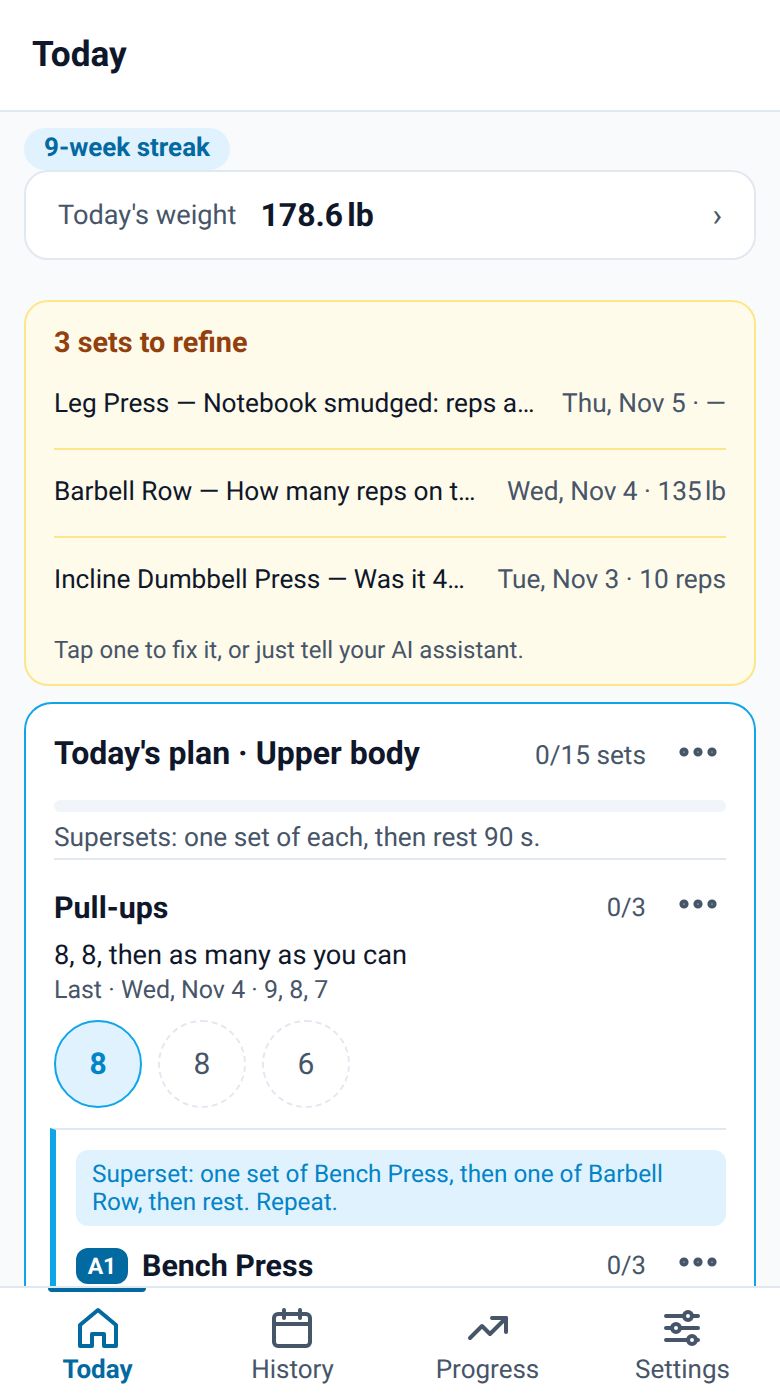
Flagged sets show in a yellow card on the Today screen. Ask your assistant "What's left to fix?": it asks the few questions that matter and fixes all the sets at once. You can also tap a set in the app and fix it yourself.
5. Use your own exercise names
Write the way you do in your notebook: "RDL", "incline DB", "lat pull". The assistant matches them to your exercises, so you don't end up with duplicates. When you explain a nickname once, it saves it, and the next time needs no question.
6. Get a plan for today
Ask for a session, for example "Plan an upper-body day like last week, a bit heavier on bench". The plan shows on the Today screen, with a circle for each set. Tap the next circle as you go: the set form opens with the planned numbers, you change what you actually did and save. For one-arm or one-leg exercises, a left and right pair counts as one set.
7. Ask about your progress
Questions like "What's my bench PR?" or "How many sessions did I do this month?" are answered from your log: personal records, the history of an exercise, or a summary of any range of dates.
What it can and can't do
- It reaches only your own log, never anyone else's.
- It records and plans training. It doesn't give medical advice.
- To stop it, open Settings → AI assistant in the app and tap Disconnect. Access ends at once.
- Exporting your data and deleting your account are only in the app (Settings). See how to delete your account.
Prefer not to use AI?
Everything works in the app alone: open an exercise, tap + Add set, and use the rest timer and the exercise timer as you train. Progress graphs and history are the same either way.